

Feature reference
Lumastra is a self-hosted server for movies, series and music, with audiobooks through Audiobookshelf and Live TV from your own sources. This page lists what it does, area by area. The quick start gets an instance running.
Movies and series
Section titled “Movies and series”- Recommendations: For You shelves, mood picks and similar titles, including titles outside your collection.
- Semantic search: search by what a film is about (needs your own AI provider key).
- Release calendar: upcoming episodes and releases for what’s in your library.
- Multi-episode files (
S01E01-E02) link to every episode they contain. - Episode ordering: matches the layout on disk, including DVD and absolute ordering.
- More than entertainment: library types for home videos, training and educational content.
- AI assistant: ask for something to watch in plain language, with your own AI provider key. See The AI assistant.
Playback
Section titled “Playback”- The server decides per client whether to play a file directly, remux it or transcode it, based on codecs, HDR and subtitles. See Playback decisions.
- Hardware transcoding works on Intel (Quick Sync / VA-API), NVIDIA (NVENC) and AMD (VA-API). Intel is the most tested. Software transcoding is available as a fallback. See GPU transcoding.
- Subtitles without burn-in: styled ASS/SSA and PGS/VobSub overlay the video, preserving HDR and avoiding a video re-encode. Browsers use AkariSub (libass for the web) and libbitsub; Apple apps receive server-rendered pictures with timing data. Burn-in remains available for clients that need it.
- Trickplay thumbnails for seeking and chapters.
All built in, in the same server as your films. No separate Subsonic server or extra tools needed.
- Audio analysis: tempo, key, energy and mood, built into the x86-64 image; an optional sonic sidecar adds sound similarity (“sounds like”).
- Smart queue: keeps going with tracks that fit, in an order that flows, with DJ crossfades between them.
- Mixes and collections built on their own, per genre and by sound.
- Song Paths (a smooth path between two songs), a Music Map of your library, and search by sound (“calm solo piano”) or by the meaning of lyrics.
- Careful tag reading, so albums, discs and compilations come out in the right order.
- OpenSubsonic compatibility, so your favourite music apps keep working. No separate Subsonic server needed. Playlists are lists you build and save; Lumastra has no rule-based smart playlists. A saved mix is a fixed list of tracks.
See Music discovery and Organizing music.
Audiobooks and books
Section titled “Audiobooks and books”- Connect Audiobookshelf, then browse and listen in the web app and the iPhone, iPad and Apple TV apps, with progress synced back to Audiobookshelf.
- In the web player, see where others on your server are in the same book.
- Search your Kavita books from Lumastra and open them in Kavita.
See Audiobooks.
Live TV
Section titled “Live TV”Built and tested for reliable viewing.
- Your sources, one guide: M3U, Xtream or HDHomeRun sources you’re licensed to receive, with automatic channel grouping, numbering and a programme guide.
- Shared streams: the default Rust proxy shares one upstream connection among viewers of the same channel; viewer heartbeats manage active sessions.
- Backup feeds: automatic failover tries alternate feeds. If none work, the player shows a failure with a choice to try another channel.
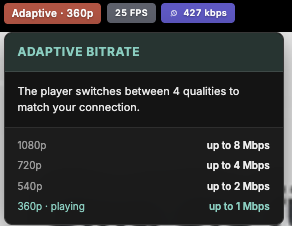
- Adaptive quality: optional GPU encoding from 1080p down to 360p lets the player switch quality to match each viewer’s connection.
- Simple mode: large controls, a personal numbered channel list, now/next information and an optional helper PIN for viewers who want a familiar TV screen.
- End-to-end testing: a synthetic provider exercises real imports, decoded playback, stream limits and upstream failures through the app and proxy.
See the Live TV guide, simple mode and the proxy architecture. Recording (DVR) isn’t supported.
Media management
Section titled “Media management”Traceable artwork, reviewed repairs and file-health evidence.
- Artwork with provenance: inspect image candidates and their recorded sources, choose the image to use and protect a curated selection. Unknown origins stay explicit.
- Reviewed identity repairs: preview a two-episode TMDB ID exchange before applying it; internal episode IDs, file links and watch data stay attached to their existing episodes.
- Album merges with a plan: review the kept album, tracks, artwork and user-data policies before confirming. Duplicate track candidates keep their separate files.
- Episodes that match your files: review boundaries in combined multi-episode files. Join split episodes into one file on disk before importing them.
- File-health evidence: inspect stream and audio-tail measurements, run a bounded recheck and keep warnings when the result is inconclusive.
- Quarantine for uncertain matches: compare historical proposals with current files and metadata, then review eligible changes before accepting a batch.
See Media enrichment, Administration and Library troubleshooting.
Together
Section titled “Together”- Watch Together: synchronized sessions between the web app and the Apple TV app. Start on the TV and friends join from a browser. (The iPhone and iPad app can’t join sessions.)
- Shared ratings, reviews and watch activity, with per-user privacy controls. See Sharing and privacy.
- Trakt and MyAnimeList sync: each user can link their own Trakt account (history in either or both directions), and watch progress goes to MyAnimeList automatically. Optional progress sync with an existing Jellyfin server works alongside.
Apps and clients
Section titled “Apps and clients”- Native iPhone and iPad apps with offline downloads, and an Apple TV app with music, audiobooks and Top Shelf. See The Apple apps.
- An installable web app for desktop and mobile.
- Jellyfin-compatible clients (such as Streamyfin) and (Open)Subsonic music apps connect directly. No Jellyfin server needed. See Connecting third-party apps.
Sign-in and security
Section titled “Sign-in and security”- Single sign-on: OIDC and reverse-proxy forward authentication are fully supported everywhere: web, iPhone, iPad, Apple TV and the API.
- Built-in accounts: username and password, on their own or alongside single sign-on. The first-run wizard creates your admin account.
- OAuth 2.0 device flow for native apps: approve a code through your server’s login, with refreshable, revocable tokens. No TV passwords or pairing that bypasses SSO.
- Your data is yours: ratings, playlists, watch state, watchlists and devices belong to their user. Other users can’t read or change them, and admin rights are separate from everyday use.
- Every route has an explicit access rule (public, signed-in user, admin, or a scoped token). A test fails when a route has no rule, or when a rule gets looser without a written reason.
- Checks per item, not just per page: a title from a library you can’t access answers “not found”, so its existence doesn’t leak.
- Narrow credentials: scoped, revocable tokens for apps and the API, short-lived playback grants instead of long-lived stream links, and read-only service tokens for integrations.
- Signed plugins: the admin decides which signing keys to trust.
- Reviewed before releases, with a private disclosure process (SECURITY.md).
See Authentication.
API, plugins and operations
Section titled “API, plugins and operations”/api/v1is documented, versioned and described by an OpenAPI spec, with scoped personal access tokens and the same OAuth device flow for your own players. See API & tokens.- Plugins for media sources, providers, subtitles, lyrics, tasks, watch sync and authentication, with an SDK for your own integrations. See Writing a plugin.
- A tracked background pipeline, an admin task system and health monitoring, and web and worker replicas. See the architecture overview and the task system.
- Deployment: Docker Compose, or Kubernetes with a Helm chart. See the quick start and Deploy on Kubernetes.
- Quick start: get an instance running
- Known limitations: read before you commit to a host